Azure CSP Billing Export
Set up automated daily Azure billing exports for Cloud Solution Provider (CSP) accounts using Azure Synapse Analytics.
Written By Dotan Cohen
Last updated About 2 months ago
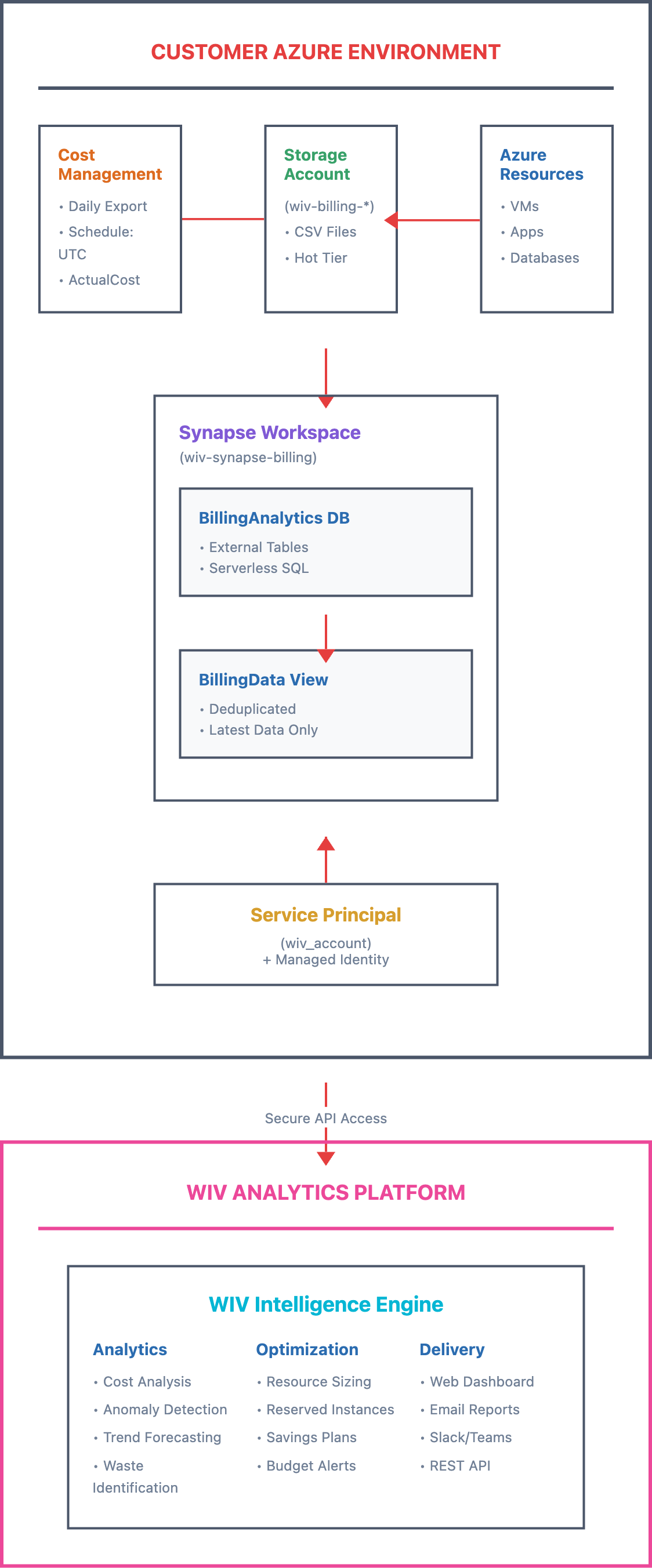
Azure Service Principal Onboarding with Billing Analytics
Executive Summary
Cost Summary
What Will This Cost Me?
What Am I Paying For?
Cost Comparison
Quick Start Guide
Prerequisites
One-Command Setup
Copy
# Clone and run git clone -b feature/billing-export-synapse https://github.com/wiv-ai/AzureOnBoarding.git cd AzureOnBoarding ./startup_with_billing_synapse.shWhat Gets Created
1. Service Principal (wiv_account)
2. Resource Group (wiv-rg)
3. Storage Accounts
4. Synapse Workspace (wiv-synapse-billing)
5. Billing Export Configuration
Architecture Overview
Your Azure Account
    │
    ├── Service Principal (wiv_account)
    │   └── Manages all authentication
    │
    ├── Daily Billing Export
    │   └── Automatically saves to Storage
    │
    └── Synapse Analytics
        └── Query billing data on-demand
Setup Options
Fresh Setup (Recommended)
./startup_with_billing_synapse.sh # When prompted: Use existing billing export? (y/n): nUse Existing Billing Export
./startup_with_billing_synapse.sh # When prompted: Use existing billing export? (y/n): y # Then provide: # - Storage Account Name # - Resource Group # - Container Name # - Export folder path⚠️ Important Notes
First-Time Setup
Data Deduplication
Cross-Subscription Access
Manual Verification
# Check service principal az ad sp show --id wiv_account # Check Synapse workspace az synapse workspace show --name wiv-synapse-billing --resource-group wiv-rg # Check billing export az costmanagement export list --scope "/subscriptions/YOUR_SUBSCRIPTION_ID"